How to turn Instagram DMs into a trip itinerary
Learn how to turn travel reels shared in Instagram DMs into a mapped trip itinerary with neighborhood clustering, daily pacing, and Google Maps export.
By The Reel to Trip team
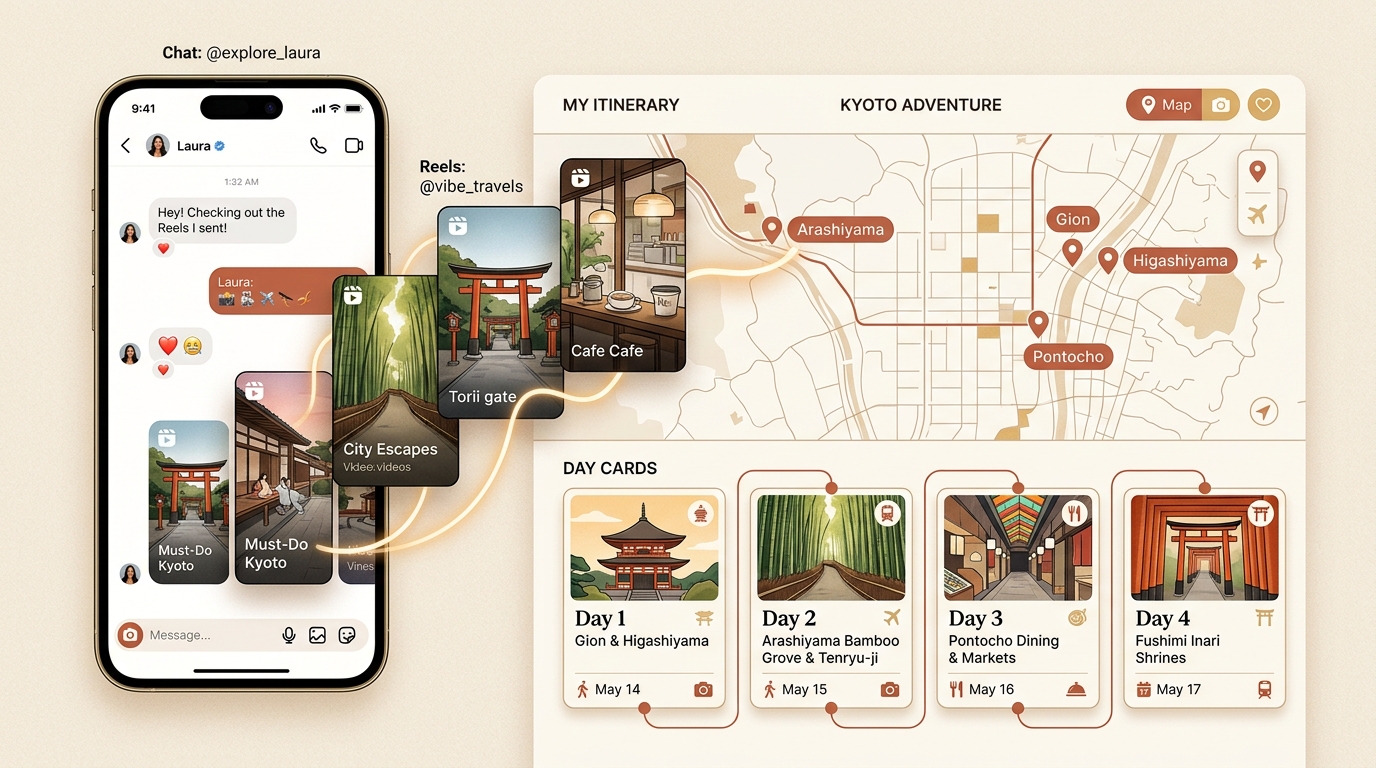
The vast majority of real-world travel research never touches a spreadsheet or a booking portal during the early stages. Instead, it happens inside Instagram direct messages. Travel partners, group chat members, and solo travelers routinely fling dozens of video clips back and forth across private message threads—a seaside cafe in Amalfi, a secret viewpoint in Kyoto, a late-night pasta counter in Rome. While direct messaging represents the most natural way to discover places, chat feeds are fundamentally chronological streams rather than geographic planning tools.
When vacation time arrives, scrolling back through hundreds of casual chat messages to retrieve forgotten reel links becomes an overwhelming chore. Transforming a scattered thread of Instagram DMs into a functional, day-by-day vacation schedule requires moving beyond the chat inbox into an organized mapping workflow.
Can you turn Instagram DMs directly into a trip itinerary?
Yes, you can turn Instagram direct messages into a complete trip itinerary by forwarding or importing travel reel links into an automated itinerary parser like Reel to Trip. The parser extracts the underlying venue names, addresses, and geographic coordinates from the video clips, plots every stop onto an interactive map, and organizes them into a daily travel route with Google Maps export.
Rather than treating each message as an isolated video, modern reel-to-trip tools aggregate every shared link under a unified destination project. This means twenty reels sent across three weeks of casual chatting automatically merge into a single, cohesive travel plan.
Why Instagram DM threads fail at trip organization
Private message threads are designed for conversational momentum, not spatial coordination. When travelers attempt to use their chat history as a travel guide, several critical friction points emerge:
- Vanishing spatial context: A reel shows a stunning bakery, but gives no hint whether it sits two blocks from your morning hotel or an hour across town in an industrial suburb.
- Chat history burial: As everyday conversations, memes, and logistical chatter continue in the DM thread, travel links get pushed hundreds of messages up the screen.
- Duplicate and conflicting recommendations: Different friends often send slightly different reels featuring the same famous landmark or conflicting opening hours, creating confusion.
- No route optimization: A chronological message list forces travelers to zig-zag across city boundaries rather than visiting adjacent venues in logical neighborhood sequence.
What is the best workflow to convert DM reels into a map?
The best workflow to convert Instagram DM reels into an actionable itinerary involves four distinct steps: gathering the video links from your chat thread, extracting location metadata with an AI parser, clustering nearby pins by neighborhood, and establishing balanced daily pacing. This approach eliminates manual copying and prevents cross-town commuting.
- Gather your shared reel links: Open your Instagram direct message conversation, tap the media/links tray in the chat details, and copy the public links of your saved recommendations.
- Parse venues into coordinates: Feed the links into a dedicated itinerary parser like Reel to Trip (or forward them directly via DM to @reeltripper). The engine reads captions, on-screen text, and audio cues to identify exact business names and addresses.
- Cluster places by neighborhood: View all extracted locations simultaneously on a unified map. Group attractions located within comfortable walking distance of each other into distinct geographic zones.
- Assign daily schedules and export: Distribute your neighborhood clusters across your available travel dates, leaving buffer time for spontaneous exploration, and export the finalized pins directly to Google Maps.
Single-pin DM bots vs unified multi-reel itineraries
When exploring tools that interact with Instagram messages, travelers often encounter two fundamentally different architectures: single-pin lookup bots and unified multi-reel planners.
Single-pin utilities (such as Hold My Pin or basic chat bots) require you to send one video at a time, replying immediately with a single Google Maps link. While helpful for a single restaurant lookup on the fly, receiving twenty separate message replies in your inbox does not create a vacation schedule. You still have twenty disconnected links to sort manually.
In contrast, dedicated multi-reel trip planners like Reel to Trip combine all incoming recommendations for a destination into one shared itinerary canvas. Five reels about Tokyo from different creators become one 15-pin interactive map, complete with neighborhood clustering, transit considerations, and day-by-day scheduling.
How do you export places from Instagram DMs to Google Maps?
To export locations from Instagram DMs to Google Maps, parse your message links through Reel to Trip to extract verified venue coordinates, then use the one-click export button to open the mapped route directly inside the Google Maps app or save the locations to a custom Google Maps list. This allows offline navigation, turn-by-turn walking directions, and live transit routing during your trip.
For a complete walkthrough of mapping options including screenshot scanners and manual custom layers, read our guide on how to export Instagram saved places to Google Maps.
Direct messages capture your genuine travel aspirations in real time. By converting those recommendations into structured maps and realistic daily routes, you can stop losing great recommendations to chat archives and start exploring them on the ground.